Introduction: Why NAS is the Core of Creative Teams
Every creative agency, video production house, or modern business faces a common challenge — the relentless tide of data. Whether it’s 4K video footage, massive photo collections, or company documents, efficiently managing, securing, and accessing this data determines productivity and peace of mind. For teams like Trakin Tech, with multiple YouTube channels and a hunger for quality, network-attached storage (NAS) is not just a convenience; it’s the backbone of the workflow.
Enter the Synology DS925+ NAS, touted as a workhorse for evolving storage needs, collaborative workflows, and bulletproof backup. But does it live up to the hype? Does its new approach empower or encroach on users’ flexibility? This exhaustive review dissects every facet of the DS925+, so you can decide if this NAS fits your ecosystem — or if its walled garden is too restrictive for your taste.
Table of Contents
- What Is the Synology DS925+ NAS?
- Design and Build Quality
- Hardware: Ports, Expansion, and Under the Hood
- Performance Testing and Real-World Use
- Drive Compatibility: The Most Controversial Aspect
- DSM Software: The Best (and Most Locked Down) OS
- Ease of Use for Beginners and Pros
- Advantages and Shortcomings — An Honest Assessment
- Alternatives: How Does DS925+ Compare?
- Who Should Buy the Synology DS925+?
- Final Verdict
1. What Is the Synology DS925+ NAS?
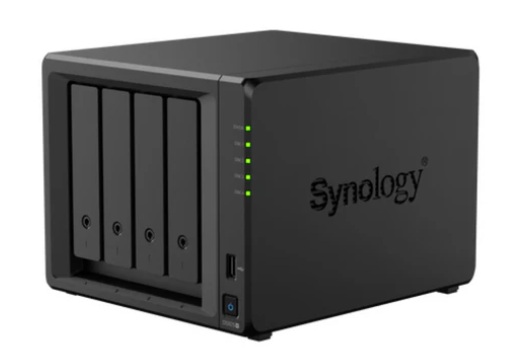
The Synology DiskStation DS925+ is a four-bay compact NAS device designed primarily for workgroups, creative professionals, small businesses, and even power users seeking centralized data management, backup, and collaborative tools. It builds atop Synology’s legacy of robust NAS solutions, introducing modern connectivity and smart expandability — but also, for the first time, restricting third-party hardware compatibility heavily.
At a Glance:
- CPU: AMD Ryzen V1500B, 4-core, 2.2GHz (no integrated GPU)
- RAM: 4GB DDR4 ECC, expandable to 32GB (only with Synology-approved RAM)
- Drive Bays: 4 native, up to 9 with Synology’s DX525 expansion
- Supported Drives: ONLY Synology-whitelisted HDDs/SSDs for storage, Synology NVMe for cache/storage pools
- LAN: Dual 2.5GbE RJ-45 Ethernet ports
- USB: 2 x USB 3.2 Gen 1 Type-A (5Gbps), 1 Expansion USB-C (for Synology DX525 only)
- M.2 Slots: 2 x NVMe (only Synology SSDs allowed)
- OS: Synology DiskStation Manager (DSM 7)
- Size: 166mm x 199mm x 223mm; Weight: approx. 2.26kg
- Target Use: Video teams, small businesses, security (CCTV/NVR), fast collaborative environments
2. Design and Build Quality
The DS925+ exemplifies what Synology fans expect: clean lines, understated branding, and a no-nonsense, tool-less chassis. With its matte black finish, subtle branding, and practical ventilation, the unit is both aesthetically pleasing and functional, designed to fit seamlessly on a desk or in a server rack.
Front and Sides
- Four hot-swappable, lockable drive bays — ideal for quick upgrades or replacements without powering down.
- Drive tray locks enhance physical security.
- Status and activity LEDs provide at-a-glance health and connection indicators.
- Single front-facing USB 3.2 Gen 1 Type-A port for quick-access file transfers or external UPS connectivity, NOT for expansion.
Rear and Expansion
- Dual 2.5GbE LAN ports — a huge leap over traditional gigabit networking, enabling faster client connections or link aggregation.
- 92mm x 92mm fans (x2) keep thermal performance strong even under heavy loads.
- Expansion Port (USB-C): Exclusively for adding the DX525 five-bay expansion unit.
- Additional USB 3.2 Gen 1 Type-A port for peripherals or a second UPS, but once again, not for storage expansion.
Bottom and Internal
- Dual M.2 NVMe slots underneath, compatible only with Synology’s certified modules for caching or as dedicated storage pools.
- No HDMI or display output—this is a pure NAS device.
- Power Supply: Integrated, efficient, with a wide AC input range and reliable operation.
Build Feel
Every component from latching mechanisms to port arrangement feels robust and considered. The toolless drive bays make both upgrades and hot-swap scenarios painless, while security features like drive locks and a Kensington slot reflect an enterprise touch.
3. Hardware: Ports, Expansion, and Under the Hood
Processing Power
At its heart is the AMD Ryzen V1500B, a seasoned 4-core, 8-thread x86 CPU clocked at 2.2GHz. There’s no integrated GPU, so expect robust file-serving performance but no hardware-accelerated video transcoding. This makes the DS925+ less ideal for a pure home media center where Plex or Jellyfin transcoding is routine; it excels as a data hub first and foremost.
RAM
The base 4GB DDR4 ECC SODIMM ensures error-correcting reliability. For power users (Docker, virtual machines), upgrades up to 32GB are possible — but only with certified Synology modules, which are pricey and scarce in many regions.
Storage Options
- 4 Drive Bays: Accepts ONLY Synology-certified 3.5″ SATA HDDs or 2.5″ SATA SSDs.
- Expansion: DX525 adds 5 more bays via exclusive USB-C, for a total of 9 drives and up to 180TB raw storage.
- 2x M.2 NVMe (2280) slots: ONLY work with Synology SSDs; these can be assigned as read/write cache or as a fast, discrete storage pool (not just cache).
- Hot-swapping: All bays are toolless and secure, making maintenance simple.
Connectivity
- 2 x 2.5GbE ports: Bringing up to 5GbE (link aggregation), more than enough for small office networks or multiple simultaneous editors.
- No 10GbE option: Unlike the DS923+, there’s no expansion slot for even an add-in 10GbE NIC. This is deliberate, as Synology withholds full PCIe lane utilization to differentiate product tiers.
- 2 x USB 3.2 Gen 1 Type-A: For peripherals — NOT storage expansion.
- 1 x USB-C expansion: Only for the Synology DX525.
Limitations
- Locked ecosystem: Expansion, M.2, RAM, and even basic drive options are locked to Synology-branded modules.
- No GPU: No hardware transcoding, affecting Plex/Jellyfin usage.
- No HDMI/DisplayPort/Audio out: This is not intended to be a local media player.
Power and Cooling
- Extremely quiet — Dual fans remain barely audible even under heavy load. However, real-world quietness depends on drive choice and room acoustics.
- Thermal performance: Excellent, stable between 35°C – 40°C in an air-conditioned environment. The unit’s airflow and fans make it suitable for 24/7 operation.
4. Performance Testing and Real-World Use
Performance is dictated by the workflow and bottlenecks — primarily the network, drive choice, and, for power features, available RAM.
Read/Write Speed
- Sequential Read/Write: Up to 522/565 MB/s, according to Synology’s specs — in practice (team Trakin Tech’s review), 100–125 MB/s over standard Gigabit LAN, leveraging SSDs.
- 2.5GbE allows window for much higher speeds, if your network can handle it.
- NVMe Caching/Storage Pools: Further boosts to random IO and database performance if used for cache or small, fast pools.
RAID Support
- Supported Modes: SHR (Synology Hybrid RAID), Basic, JBOD, RAID 0, 1, 5, 6, 10.
- Flexibility: Maximized if you only use Synology’s verified drives; drive locks prevent any third-party disks from being used for actual storage.
Network and Collaboration
- Multiple channels: Trakin Tech produces up to 500GB per channel per video; DS925+ provides seamless centralization and accessible backups.
- Suitable for 4K video workflows, photo archiving, surveillance camera footage, and heavy simultaneous client access.
Thermal and Acoustic Profile
- Thermals: Stable, barely rising above 40°C in climate-controlled (24°C) environments — even under heavy editing and backup tasks.
- Acoustics: Whisper-quiet — one of the quietest Synology NAS units tested, according to Team Trakin Tech.
Media Server Caveats
- NO hardware transcoding: Direct play works fine, but any live video conversion drains CPU, making Plex/Jellyfin impractical for large home media centers. Working with raw files (video/image backup, editing) poses no issue.
5. Drive Compatibility: The Most Controversial Aspect
The Big Change
Unlike previous Synology NAS models, the DS925+ enforces a locked-down drive compatibility policy: ONLY Synology-branded (and specifically whitelisted) drives and SSDs can be used for storage pools. Attempts to use popular NAS drives like WD Red or Seagate IronWolf result in error messages and refusal to create storage pools.
- Whitelisted HDDs: Synology HAT3300, HAT5300, own SSDs/NVMe SAT5200 for M.2.
- Third-party drives: May work unofficially as storage expansions but will NOT be accepted for primary storage pools or advanced features, and may show compatibility warnings.
Why Did Synology Do This?
- Tighter control over ecosystem: Ensures firmware optimization, monitoring, and (potentially) increased reliability.
- Unified experience: Smoother updates, guaranteed performance and health checks… in theory.
Drawbacks
- DIY flexibility lost: Existing drives cannot be repurposed, undermining cost-saving upgrades for home labs and power users.
- Cost: Synology’s official drives are significantly more expensive than equivalent third-party drives of the same capacity/performance.
- Availability problems: Sourcing Synology drives is tough in many regions, especially in India.
- Unclear reliability advantage: No concrete evidence that Synology drives outlast or outperform WD, Seagate, or Toshiba NAS drives in independent testing.
Bottom Line
The drive lock is the single biggest con for power users and upgraders. If you already own non-Synology NAS drives or want the freedom to pick your hardware, look elsewhere. But if “everything just works” matters more than DIY flexibility, this walled garden might actually appeal.
6. DSM Software: The Best (and Most Locked Down) OS
DiskStation Manager (DSM) is the world’s leading NAS OS for a reason. DSM 7 is:
- Slick, fast, and intuitive.
- Packed with features: Active Backup, Synology Drive (sync/collaboration), Photos, Surveillance Station, Docker app support, Virtual Machine Manager, scheduled snapshots, and more.
- Easy to set up for first-timers, but layered enough for sysadmins.
Highlights
- Snapshots and Scheduled Backups: Protects from accidental deletions, malware, or rollback errors.
- Hybrid RAID, versioning, and regular updates ensure both resilience and peace of mind.
- Beginner-friendly yet deep: Quick to get running but supports virtualization, containerization, and advanced backup tasks.
- Frequent updates: Security and features are enhanced regularly.
Downsides
- Drive lock policy is enforced in software, not just hardware: even if physical drives are compatible, DSM won’t let them be used if they’re not Synology-approved.
- Advanced features (VMs, Docker, etc.) demand more RAM than the base 4GB, further compounded by the Synology-only RAM upgrade route.
7. Ease of Use for Beginners and Pros
Production teams that lack deep technical expertise will find the DS925+ to be a blessing. DSM’s clean UI, thorough tutorials, and prepackaged solutions mean there’s almost no learning curve. Simplicity is king here — install, power on, log in, and you’re syncing and backing up immediately.
- For the tech-savvy: DSM offers power-user features (Docker, Virtual Machine Manager, complex RAID/sharing scenarios, advanced ACLs), but is careful to hide complexity from casual users.
- For offices with limited IT resources: Trakin Tech’s experience shows a non-technical production team running hundreds of GBs of media daily with no friction.
8. Advantages and Shortcomings — An Honest Assessment
Advantages
- Centralized, secure, and fast storage for heavy data loads.
- Dual 2.5GbE ports: High bandwidth for modern networks without requiring 10GbE switches.
- Superb build quality, hot-swappable and lockable bays for fast upgrades and maintenance.
- DSM remains the benchmark by which all other NAS OS are judged — versatile, reliable, approachable.
- Consistent performance: Stable thermals, silent operation, good power efficiency.
- Ideal for teams scaling quickly or those needing expansion without a disruptive form factor.
- Excellent software ecosystem: Surveillance, photo management, backup, collaboration, virtualization, and cloud sync.
- Long-term support: Up to 5 years warranty in some regions.
Shortcomings
- Strict “walled garden” approach: Only Synology drives/RAM/modules permitted; blocks third-party drives at firmware and DSM level.
- No 10GbE option or PCIe expansion: An artificial limitation ensures only “higher” Synology models support faster networking.
- No hardware video transcoding: Not suitable as an all-in-one Plex/Jellyfin media server if transcoding is required.
- Upgrades are costly: Synology RAM/SSD modules are less available and much more expensive than standard modules/drives.
- Not ideal for home lab tinkerers or DIY enthusiasts.
- Potential supply chain issues: Stock for Synology only components can be tight in certain regions.
9. Alternatives: How Does DS925+ Compare?
DS923+: Previous model, uses a slower expansion port but allows for some third-party drives and 10GbE expansion in certain markets.
QNAP: Generally more open in drive/RAM selection, often feature a 10GbE upgrade path, but DSM’s maturity and security tend to outshine QNAP’s QTS for many users.
TrueNAS Unraid, or DIY: Superior flexibility and cost coupling, but require deep IT skills and significant setup/maintenance. No DSM-level polish.
10. Who Should Buy the Synology DS925+?
Get the DS925+ if you:
- Need bombproof, set-and-forget business storage.
- Value DSM’s unmatched blend of user-friendliness and advanced features.
- Want seamless multi-client editing, backups, and sharing.
- Don’t mind a little extra cost for tight integration, vendor support, and regular updates.
- Are in a team with modest technical resources and require minimal IT headaches.
- Accept the higher cost and limitations of a closed Synology ecosystem for peace of mind.
Skip it if you:
- Already own high-quality NAS drives not made by Synology.
- Require hardware video transcoding for heavy Plex/Jellyfin multi-client streaming.
- Insist on being able to upgrade RAM, storage, and expansion with industry-standard parts.
- Need 10GbE networking or advanced backup features without breaking the bank.
11. Final Verdict
The Synology DS925+ NAS is a near-perfect solution if simplicity, reliability, and support outweigh raw flexibility. It is unmatched for creative teams working with heavy data, offers a truly world-class management OS in DSM, and, if coupled with Synology official components, delivers peace of mind rarely matched in the small business NAS market.
However, Synology’s bold move towards ecosystem lock-in marks a clear philosophical shift. For those engineers, home-labbers, or upgraders who see storage as an evolving, modular project, DS925+ may feel like a closed door rather than an open platform.
In the end, if you’re comfortable in the “Apple-style” walled garden, the DS925+ will serve you brilliantly for years — just be prepared to pay a premium, not just in cash, but in the freedom of choice.