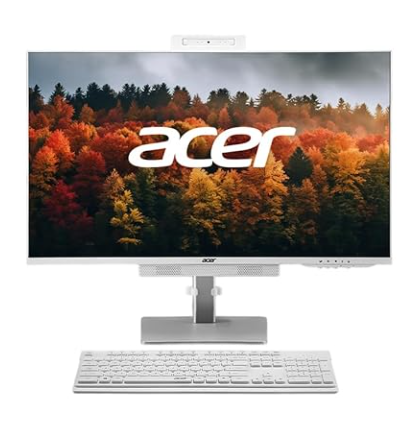
Today we are reviewing the Acer Aspire C24 All-in-One desktop PC, an impressive machine priced under ₹60,000, specifically currently available for approximately ₹55,790 on Amazon. This system stands out in the budget All-in-One PC category by combining decent build quality, a useful feature set, and balanced performance suitable for home users, students, and casual gaming. Let’s take a comprehensive look at what this machine offers, its specifications, usability, and performance based on extended use and various tests with gaming, productivity, and multimedia tasks.
Design and Build Quality
Starting with the physical design, the Acer Aspire C24 All-in-One features a 23.8-inch Full HD IPS display that provides vibrant colors and wide viewing angles, perfect for watching YouTube videos or working on graphic tasks. The display is equipped with a matte finish, reducing glare and reflections, which is a plus for comfortable use in various lighting conditions. The bezels around the screen are minimal, offering a clean modern look and better screen utilization. At approximately 400 nits brightness peak, the screen is sufficiently bright for indoor use.
One of the interesting ergonomic features of this AIO is its adjustable stand. The metallic stand is sturdy and allows users to tilt, rotate between portrait and landscape mode, and adjust the height of the display smoothly and effortlessly, which is rare at this price point. This adds a lot of flexibility for different usage scenarios, such as reading documents in portrait mode or doing design work with the screen angled for comfort.
The webcam is a notable feature: it’s a 5-megapixel Full HD camera with a privacy shutter. The physical shutter can block the camera lens when not in use, ensuring privacy. The camera itself is pop-up style, which can be pulled out or pushed back into the chassis, giving users added control. It also includes an array microphone system to support clear video calls and conferencing, enhanced by dual front-firing stereo speakers (2 x 3W, totaling 6W output) integrated with a front soundbar that delivers clear and crisp audio, besting many budget PCs in sound quality.
The chassis is made predominantly of polycarbonate plastic around the display, which keeps the entire unit light at around 5-6 kilograms, making it easy to move or readjust. The rear part houses the main system components internally, including the processor, RAM, storage, and ports.
Ports and Connectivity
In terms of connectivity, the Acer Aspire C24 is well-equipped. On the bottom edge of the device, users get a good selection of ports: an HDMI port can be used for connecting this PC to an external monitor if desired, multiple USB Type-A ports for peripherals, an RJ45 Ethernet port for wired network connections, a combined audio/microphone jack, and a VGA (VJ) connector for those who might want to connect older monitors. Additional USB Type-A and USB Type-C ports are available on the side of the unit, along with an SD card reader, a dedicated RGB lighting customization button, and a 3.5mm audio jack. This array covers most general user needs without requiring multiple adapters.
Connectivity features include Wi-Fi 6 and Bluetooth 5.2, ensuring fast wireless network speeds and stable peripheral connections with compatible devices. The bundled keyboard and mouse come wireless, utilizing a dongle for connection to the PC, freeing up cable clutter on the desk.
Core Specifications
Powering the Acer Aspire C24 is an Intel Core i5-12450H processor, a modern 12th generation Intel chip that offers four performance cores and four efficiency cores (totaling 8 cores – or in some references four performance and four efficiency cores — with a total of 12 threads) and a maximum turbo frequency reaching 4.4 GHz. This processor combined with integrated Intel UHD graphics provides good all-around computing power for office applications, light creative work, and multimedia consumption. It is not a gaming-specific chip but can handle casual gaming.
For memory, our review unit is equipped with 16GB of DDR5 RAM running at 3200 MHz, which is excellent for multitasking and more demanding applications like photo editing and video editing at 4K resolution on moderate timelines.
Storage consists of a 512GB PCIe Gen4 SSD offering blazing-fast read and write speeds, which help the PC boot quickly and load applications without delay. This size of storage is suitable for general users with moderate media libraries and productivity files.
Out of the box, the PC runs Windows 11 Home edition, preloaded with basic utilities like Microsoft Office and POWI NIO, which are useful for productivity tasks without additional software installations. This ensures that users can start working efficiently immediately after setup.
Setup and Usage Experience
Unboxing the package reveals the PC unit, a robust metallic stand (which requires screwing on), and basic peripherals: a full-size keyboard with a number pad and a tactile typing feel, and a wireless mouse. The power adapter is rated at 150W, sufficient to provide steady power to the system.
Setting up the unit is straightforward: attach the stand, connect power, and pair the wireless peripherals via the dongle. The device is thin and compact, saving desk space compared to traditional desktop setups involving separate CPU and monitors.
The matte finish display and well-built hinge allow smooth adjustments in height, tilt, and rotation. Using the portrait mode for document reading is convenient, and the slim bezels offer an immersive visual experience.
Performance Testing
Despite not being marketed as a gaming PC, the Acer Aspire C24 was tested with popular games to evaluate its real-world capabilities.
- GTA 5 was run at 720p resolution to balance performance with visual quality. The system achieved an average frame rate of about 45 FPS, which is playable with acceptable smoothness. Running the game at full HD resolution would reduce frame rates further, so 720p is recommended for better results.
- Valorant, a competitive e-sports title, was tested at full HD resolution and delivered an impressive 120 FPS on average. The game ran smoothly, highlighting the integrated graphics capability for light gaming experiences.
Temperatures remained stable during gaming sessions, with the CPU peaking at around 75°C and mostly operating below 70°C, indicating an effective thermal design that avoids throttling under load.
For productivity, the system handled common tasks like photo editing on Adobe Photoshop well, as the 16GB RAM and Core i5 processor contributed to responsive performance.
Video editing was tested with DaVinci Resolve (AOB Peri Pro) on 4K 60FPS timelines with two to three layers. While some occasional lag was noticed, basic 4K editing and full HD projects could be done efficiently. This capability makes it suitable for amateur to semi-professional content creators who need a compact and affordable editing workstation.
Display and Audio
The Full HD IPS display supports vibrant color accuracy and wide viewing angles, making it suitable for creators and media consumers alike. The matte finish reduces glare and fingerprints, enhancing everyday usability.
Audio output from the front-firing dual speakers totaling 6 watts delivers clear and rich sound for a budget AIO PC, which is beneficial for video calls, media playback, and casual gaming.
Special Features
The 5MP Full HD pop-up webcam with a privacy shutter is a unique highlight in this segment, allowing privacy-conscious users to physically block the camera lens when not in use.
The system includes customizable RGB LED lights on the rear with various lighting modes, which add a personal touch and aesthetic value to the workspace.
Benchmarks
Various benchmarks were run to quantify the system’s performance:
- Cinebench R23 yielded a multi-core score of approximately 8,351 and a single-core score around 1,462, demonstrating strong multicore and decent single-core performance.
- Geekbench 6 results showed a single-core score near 1,733 and a multi-core around 5,600, confirming the processor’s capability for mainstream computing tasks.
- 3DMark Fire Strike benchmark reported a score of about 297 for graphics performance, whereas the Time Spy benchmark gave roughly 886 points, reflecting the limitations of integrated Intel UHD graphics.
- PCMark 10 scored approximately 4,875 in overall productivity, confirming the system’s suitability for office workflows and multitasking.
Summary
Overall, the Acer Aspire C24 All-in-One PC offers remarkable value for just under ₹55,000 to ₹60,000 price bracket. It is ideal for home users, students, office workers, and users needing a compact, stylish PC with decent performance. Casual gaming is supported on moderate settings, and productivity tasks like MS Office, Photoshop, and video editing at Full HD can be comfortably handled.
The flexible ergonomic design, quality display, sturdy build, and useful features like the pop-up privacy webcam and good connectivity options make this a compelling pick in the budget AIO PC market segment.
If you are looking for a reliable desktop replacement that minimizes clutter and offers decent power for everyday tasks, the Acer Aspire C24 is well worth considering.