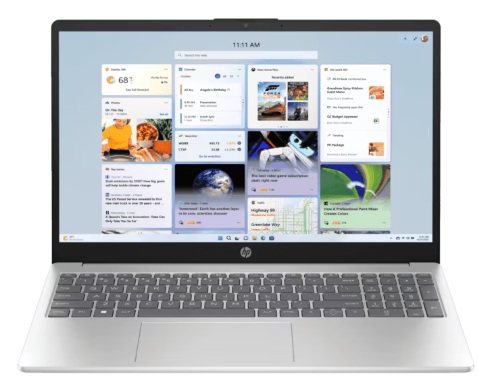
The HP 15 FD1253TU is a newly launched laptop powered by Intel’s latest Core 3 100U CPU from the 14th generation series. Targeted mainly towards students, office workers, and basic usage scenarios, this model excels by offering modern specs at an affordable price point of approximately ₹35,000 in India. In this detailed review, we will cover everything from its physical build, hardware components, performance benchmarks, gaming capabilities, battery life, and connectivity features to overall suitability for different user needs.
Unboxing and First Impressions
Opening the box, the HP 15 FD1253TU comes with a simple yet premium feeling packaging. Inside you will find the laptop itself, a 65W power adapter, power cable, and minimal paperwork. This 65W adapter is a standard across many HP laptops, including pricier models up to ₹50,000, showing HP maintains consistency in accessory quality.
The laptop is finished in natural silver, giving it a sleek and modern look. The chassis is entirely made of polycarbonate plastic, which strikes a balance between durability and weight. When pressing the top lid, some slight flex is felt due to the polycarbonate material, but it remains sturdy enough for everyday use.
The overall weight is around 1.6 kg, making it relatively light for a 15.6-inch laptop. On the bottom, thick rubber grips improve stability and air intake for cooling. The build quality aligns well with HP’s typical 15 series standards in this price range.
Display and Design
This model features a 15.6-inch Full HD (1920×1080) anti-glare display with a brightness level of about 250 nits. Color reproduction covers roughly 45% of the NTSC color gamut, which is typical for budget laptops. The display quality is decent for day-to-day applications like web browsing, office work, and video streaming but not ideal for professional photo or video editing.
The bezels on three sides are narrow, while the bottom bezel hosts an HP logo. The top bezel incorporates a full HD webcam with a physical privacy shutter, addressing privacy concerns. While the webcam’s video quality is not premium, it is sufficient for video calls and online learning.
The laptop lid opens wide, although it’s not possible to open it with a single hand. The hinge mechanism feels robust and reliable, capable of holding the display firmly at any angle.
Keyboard and Trackpad
The full-sized keyboard includes a numpad, which is a bonus for a 15.6-inch laptop, supporting productivity tasks. Key travel is adequate but some slight flex is observed, expected in this budget category. The power button is integrated into the keyboard deck.
Unfortunately, there is no backlit keyboard, which is typical for laptops under ₹35,000 from HP. The trackpad, however, is large and supports Windows 11 multi-touch gestures, providing smooth and responsive input for daily use.
Hardware Configuration
The star of the show is the Intel Core i3 100U processor — a 14th generation CPU with 6 cores and 8 threads, featuring a max turbo clock speed of up to 4.7 GHz and 10 MB L3 cache. It includes 2 performance cores and 4 efficient cores. The processor consumes up to 55W of power, which is relatively high, promising good performance for its class.
This laptop comes with 8GB of DDR4 RAM clocked at 3200 MHz installed in a single channel configuration, but future RAM upgrades are possible.
Storage is a fast 512GB PCIe NVMe Gen4 SSD, delivering sequential read speeds above 5000 Mbps, ensuring speedy boot times (14 seconds) and application launches. The storage is on a single M.2 slot setup, allowing future upgrade to 1TB.
For graphics, there is integrated Intel UHD Graphics with 4GB shared memory, suitable for light gaming and general multimedia.
Connectivity and Ports
The HP 15 FD1253TU has a commendable array of ports:
- 1 USB 3.2 Gen 2 Type-C port supporting power delivery, display output, and HP’s slip-and-charge feature (for charging devices when the laptop is off). This is notable for the budget category and a first for HP at this price.
- 2 USB 3.2 Gen 1 Type-A ports (one each on the left and right side).
- An HDMI port for external display connectivity.
- A 3.5mm headphone/microphone combo jack.
- An AC smart pin for charging.
On the wireless front, it supports the latest Wi-Fi 6 and Bluetooth 5.3, ensuring fast and stable connectivity.
Performance Benchmarks
Multiple synthetic benchmarks have been run to assess CPU and GPU performance:
- Cinebench R23 shows strong single and multi-core scores exceeding those of i3 1315U from 13th gen.
- Geekbench 6 CPU and GPU results demonstrate competent multi-threaded processing power.
- 3DMark Time Spy indicates average performance from integrated GPU for this class.
- CrossMark and PCMark 10 benchmark scores hover around 5000, confirming smooth overall system performance.
For video editing, the laptop encoded 1-minute 4k footage to 1080p in about 1 minute 14 seconds, which is decent for casual editing but not professional workloads.
Gaming Tests
Gaming on integrated Intel Radeon graphics isn’t ideal for heavy games but casual titles work fine:
- The older game “Packs of the Line” played at HD resolution on medium settings averaged 45 fps with no lag.
- “Need for Speed” at Full HD resolution on medium settings achieved a playable 30 fps frame rate.
Both games saw CPU temperatures around 70-75°C, indicating manageable thermals under load.
Battery
Battery life measures at around 4-5 hours under typical light usage with a three-cell 41 Wh battery. This is acceptable for an office or student laptop but not outstanding.
Software and Additional Features
Windows 11 comes pre-installed with a lifetime license, including Microsoft Office 2024 lifetime activation — a great value addition for students and office users.
Audio output is via two 2W stereo speakers, delivering satisfactory sound quality for basic media consumption.
Security features like the webcam privacy shutter and a secure Windows login are also present.
Suitability and Recommendations
The HP 15 FD1253TU is best suited for:
- Students requiring reliable daily performance for study, assignments, and online classes.
- Office professionals handling web, MS Office, conferencing, and light multimedia.
- Casual users who want a modern chipset and solid performance on a budget.
- Casual gamers who can accept medium to low settings in HD resolution.
- Users wanting decent storage speed with option for future expansion.
However, it is not recommended for:
- Heavy programming or development tasks (recommended to opt for Core i5 laptops for coding).
- Professional video editing or heavy content creation.
- Gamers who want high graphics settings or 1080p+ gameplay.
- Users needing backlit keyboards or enhanced display color accuracy.
Alternatives in Same Price Range
For those searching in the under ₹35,000 segment, some alternative options discussed:
- Samsung Galaxy Book4 with 13th Gen i3 and IPS display (better for display quality).
- Asus Expertbook P1 with 13th Gen i3 and 16GB RAM within same budget.
- Lenovo IdeaPad 1A powered by Ryzen 5 5625U recommended for users needing better coding support and more power.
Final Remarks
At ₹35,000, the HP 15 FD1253TU delivers impressive value backed by Intel’s latest 14th Gen Core i3, fast NVMe SSD, and future upgrade paths. It balances price and performance well for everyday computing needs. While it falls short on premium features like backlit keyboards and professional-grade displays, it remains an excellent option for students and office users focusing on productivity and casual multimedia use.