Introduction: The Changing Face of Premium Laptops
As performance demands from users continue to grow, key players in the laptop market are pushing the boundaries of what defines a premium laptop. Dell’s Inspiron series has traditionally targeted a balance of value and quality. However, 2025’s Inspiron 16 Plus 7640 redefines this segment: not only is it part of Dell’s top 7000 series, but it’s powered by Intel’s newest Core Ultra 5 125H processor with AI acceleration, Intel Arc graphics, and hosts a suite of features targeting productivity, content creation, and smart personal computing.
This comprehensive review, based on a stepwise unboxing, hands-on tests, and in-depth analyses gives you a detailed, practical understanding of what to expect if you’re weighing this model for your next purchase.
Unboxing and First Impressions
The moment you open the box, you experience Dell’s intention to deliver a premium product experience. The packaging is minimalist yet secure, with all contents neatly arranged. Upon unboxing, you receive extensive paper documentation, a premium-quality power cord, and a robust 100-watt Type-C charger—a rare inclusion in non-gaming laptops in this range. The charger’s cable length is generous, and Dell’s glowing logo on the charging brick underscores its flagship ambitions.
Design & Build
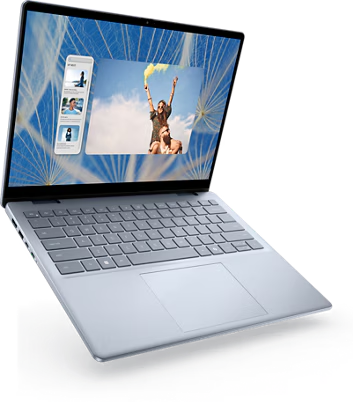
- The Inspiron 16 Plus 7640 stands out with its Ice Blue color variant, carrying the distinctive Dell logo at its center.
- The chassis and palm rest are constructed from metal, which significantly elevates tactile quality, while the laptop’s bottom uses high-grade plastic for a sturdy yet lightweight feel.
- At 1.86 kg, it offers portability for a 16-inch device; it’s not ultralight, but considering the robust cooling and feature-set, it’s justified.
- Rounded edges enhance both comfort and aesthetics, and dense construction ensures minimal flex even when pressure is applied to the lid.
A unique detail: large, thick rubber grips on the underside, maximizing air intake and providing a stable grip on smooth surfaces. A distinct feature for protection is the dual front rubber standoffs to prevent scratching when opening the lid.
Internals, Upgradability, and Components
Dell caters to DIY enthusiasts who might want to upgrade components — but there are caveats.
Access and Upgrades
- Back Panel: The rear panel can be removed (with care) granting access to upgradable slots.
- SSD: Only one M.2 slot is present. The default 512GB NVMe SSD (2230 size) can be replaced with a larger capacity SSD, up to 1TB, and Dell also supports longer 2280 size SSDs for even greater space.
- RAM: Onboard only — the Inspiron 16 Plus 7640 comes with 16GB LPDDR5X RAM (6400 MHz) soldered. There is no room for expansion, but the high speed and ample capacity on board make it sufficient for most users, even for content creation and intensive multitasking.
- Battery: Houses a high-capacity 64Wh battery, supporting heavy workloads and moderate out-of-office endurance.
Overall, the internal layout prioritizes durability and upgradability in storage, with RAM fixed — a common trend in ultrabooks to maximize efficiency and compactness.
Keyboard, Trackpad & Input Devices
- Keyboard: Dell includes a full-size, international English keyboard with two-level backlighting. However, surprisingly for a 16-inch device, there is no Numpad, even though prior models in the lineup included it.
- There is, however, a dedicated Copilot (AI Assistant) key and a fingerprint sensor embedded in the power button, allowing for fast, secure logins.
- Key travel is ample and stable thanks to the rigid chassis beneath the keyboard, and typing feedback feels premium and fatigue-free.
- Trackpad: Not as large as expected given the palm rest area, but its smooth surface, multi-gesture support, and Windows Precision drivers ensure reliability and accuracy.
Branding is tastefully minimal, with discrete “Intel Evo” and “TV Rand” tags on the palm rest.
Core Hardware and AI Performance
Intel Core Ultra 5 125H Processor
- Clocked up to 4.5 GHz, the Core Ultra 5 125H features 14 cores, 18 threads, and 18 MB cache, arranged as four Performance, eight Efficient, and two Low Power Efficient cores.
- This architecture allows the CPU to delegate background, light, and heavy tasks intelligently, prolonging battery life and enabling seamless AI computation.
AI Capability
- An onboard Intel AI Boost NPU chip specifically accelerates tasks such as video conferencing enhancements, background blurring, and new generative AI workflows in supported apps.
- This hardware-level acceleration is becoming increasingly important as creative AI software and productivity suites leverage dedicated NPUs for on-device tasks.
Memory and Storage
- 16GB LPDDR5X RAM ensures smooth operation for multitasking, productivity, and creative applications. The high 6400 MHz clock speed means there is little bottleneck when switching between RAM-intensive apps.
- The 512GB PCIe NVMe Gen4 SSD is snappy; benchmarks confirm rapid boot times (as low as 15 seconds to desktop) and impressive read/write speeds.
Graphics
- Integrated Intel Arc Graphics with up to 8GB shared memory handle GPU-accelerated tasks and light gaming decently.
Display and Visual Experience
- The Inspiron 16 Plus 7640’s 16-inch Full HD+ WVA anti-glare display uses a 1920 x 1200 resolution (16:10 aspect ratio), yielding extra vertical space for productivity versus typical 16:9 panels.
- It boasts thin bezels on three sides for immersive visuals and minimal distraction.
- Brightness peaks at 300 nits — suitable for indoor and some outdoor use.
- Color accuracy is 45% NTSC. It is good for general content creation, mainstream photo editing, and streaming, though not recommended for high-end color grading or professional print work due to lack of 100% sRGB.
- The matte surface reduces reflections, and IPS-like WVA technology ensures wide viewing angles. Out-of-the-box colors are vivid, with good contrast and grayscale rendering.
For media consumption, the display delivers crispness and clarity, while its aspect ratio makes it excellent for coding, writing, and large Excel sheets.
Ports and Connectivity
Dell packs a diverse and versatile array of ports to satisfy both office and creative users:
- Right Side: 1x USB 3.2 Gen 1 Type-A, 1x 3.5mm headphone/mic jack, 1x SD card reader.
- Left Side: Smart AC pin, 1x HDMI, 1x USB 3.2 Gen 1 Type-A, and — crucially — 1x Thunderbolt 4 (USB-C), which enables:
- Power delivery,
- Multi-display output,
- 40 Gbps data transfer.
Wireless: Dell includes the latest Wi-Fi 6E and Bluetooth 5.3, maximizing wireless speeds, range, and stability even in congested environments.
Performance Benchmarks
Synthetic Results
- Cinebench R23, Geekbench 6 (CPU & GPU), 3DMark Time Spy, PC Mark 10: The Inspiron 16 Plus 7640’s numbers are consistently solid for its segment, confirming its ability for heavy multitasking, office suites, and moderate creative workload.
- PC Mark 10 reports a score of 6394 — well above the benchmark for fluid multitasking (5000+ is considered very strong).
Real-World Tests
- Video Editing (FHD/4K): Projects in Adobe Premiere Pro and Filmora handled seamlessly, with timelines playing back smoothly and rendering times impressively short (1-minute 4K to 1080p encode in just 41 seconds).
- Photo Editing: Photoshop use is lag-free, even with large files.
- Boot & Load: From power-on to Windows 11 desktop takes just over 15 seconds.
Gaming Capability
While not a pure gaming machine, the integrated Arc GPU is surprisingly capable:
- GTA V: 60-70 fps at Full HD+ (medium settings), falling to 30 fps in heavy scenes or with natural vision mods.
- Rise of the Tomb Raider: 45 fps (FHD+, medium).
- Other AAA Titles: 30-50 fps range at medium settings; smooth, playable, with fan noise increasing under extended load.
As expected, for modern, intensive AAA games at ultra settings, you’d want a dedicated gaming laptop with discrete graphics. However, for light to moderate gaming, the Inspiron 16 Plus 7640 holds its own admirably.
Battery Life
- The 4-cell 64Wh battery is paired with efficient power management inherent to the new S-series processors and Intel EVO platform.
- Real-world usage: With screen at 60% brightness, keyboard backlight off, light movie streaming, and web browsing, you can expect between 5 to 6 hours of battery life under mixed everyday workloads.
- For heavier, sustained use (e.g., video editing, gaming), expect 3-4 hours — solid for a 16-inch performance ultrabook.
Software and User Experience
- Ships with Windows 11 and pre-activated Microsoft Office Home & Student 2021 (lifetime).
- My Dell Application: Allows users to customize color profiles, switch between performance modes, and set sound configurations.
- Sound system features 2W front-firing stereo speakers with Dolby Atmos support — audio reproduction is loud, crisp, and detailed for laptop class, suitable for entertainment and calls.
Value Proposition and Pricing
Despite its premium tier positioning (Dell 7000 series), the Inspiron 16 Plus 7640 is impressively well-priced:
- Launch Price: INR 70,000
- Street/Deal Price: Commonly found between INR 60,000 – 62,000 during sales; has even dipped to INR 60,000 on Flipkart.
- For the price, you get a well-crafted chassis, premium features, the latest Intel Evo certification, genuine upgradability (storage), and real AI utility.
Everyday & Professional Uses
Ideal Use Cases:
- Day-to-day productivity (Office, web-browsing, multitasking)
- FHD video editing and light creative work
- Coding, web development, and app design thanks to the tall 16:10 panel
- AI-based workflows as they mature on Windows (background blur, voice enhancement, etc.)
- Occasional gaming and entertainment streaming
Limitations:
- No expandability for RAM (what you get is what you live with)
- Display is not suited for color-critical professionals (45% NTSC, not full sRGB)
- No dedicated Numpad (despite 16-inch screen real-estate)
Conclusion: Is It Worth It?
The Dell Inspiron 16 Plus 7640 successfully blurs the lines between a creator laptop, a power-user machine, and a smart productivity tool. It does justice to Dell’s 7000 series reputation, delivers robust build, strong compute and AI features, and future-proofs you against the coming wave of AI-driven applications.